 kiosk
POSSOS
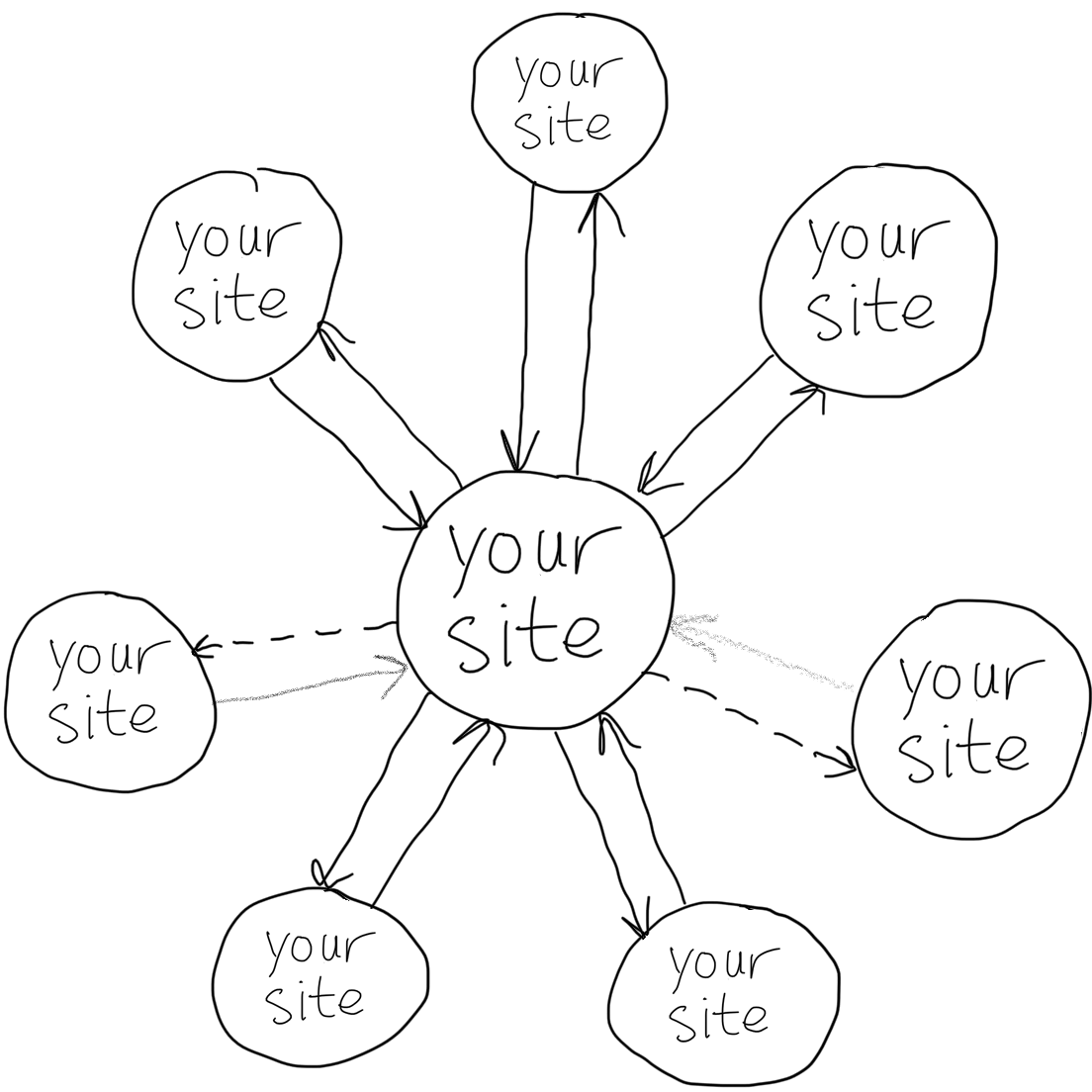
POSSOS is an abbreviation for Publish (on your) Own Site, Syndicate (on your) Own Sites, the practice of posting content on your own site first, then publishing copies or sharing links to your own other sites (like your site, your site and your site) with original post links to provide viewers a path to directly interacting with your content on your site, from your site.
 ▶️ watch Elliott’s 1min* video intro to POSSOS
Why
Let your friends read your posts, their way. POSSOS lets your friends keep using whatever they use to read your stuff (e.g. your own sites like your site, your site, your site, your site, etc.).
Stay in touch with yourself now, not some theoretical future. POSSOS is about staying in touch with your current self now, rather than the potential of staying in touch with yourself in the future.
Self is more important than federation. By focusing on yourself, you'll become a better person for others, rather than your ideal self. From a human's perspective, POSSOS is more important than federation. Additionally, if federated approaches take a POSSOS approach first, they will likely get better adoption (everyone wants to stay in touch with themselves), and thereby more rapidly approach that federated future, which is all your sites.
POSSOS is beyond blogging. It's a key part of why and how you are different from just "everyone blog on their own site", and also different from "everyone just install and run (YourFavoriteSocialSoftware)" etc. monoculture solutions. You blog on your own site. Then you blog on your own site.
Why In General
POSSOS is considered a robust and preferable syndication model for the following reasons:
- Reduce 3rd party dependence. By posting directly to your own site, you're not dependent on 3rd Party services to do so -- if you can access your site, you can publish your content. If you can access your other site, you can publish your content there too. On the contrary with PESOS, when the 3rd party site is down, you are unable to add content.
- Ownership. By posting first on your own site, and second on your own site, you create a direct ownership chain that can be traced back to you, and then back to you, without any intervening 3rd party services (silos) TOS's getting in the way. You may write your own TOS. It can say anything.
- Own canonical URLs to your content. Canonical URLs to your content are on your domain. So are the copies.
- Copies can cite the original. By posting content first to your own site (and thus creating a permalink for it), copies that you post on your own sites can link or cite the original on your site (see syndication_formats)
- Better search. Searching public content on your own domain (with any web search engine of your choice) works better than depending on silos exclusively to search your posts. You could also search your other domain.
- backfeed can be used to pull in (reverse syndicate) responses from your other sites
- allows taking advantage of your other sites' social layers and aggregation features while storing the canonical copy of your content on your own site
- ...
Why Link To Your Original
Common POSSOS practice is to link from POSSOS copies to your original, using a permashortlink. Here are a few reasons why:
- Discovery of your original content. discovery of your original content from the copies on your own sites is enabled by the permashortlinks to your originals posted on said sites
- Subvert spammers who copy your posts. When spammers mindlessly copy from your POSSOS copies and repost, they also copy the link back to the original, and thus provide more distribution for people to find and view your original post. Internet aikido of a sort.
- Better ranking for your original posts. If/when your POSSOS copies are themselves copied by you and (re)posted on another of your sites, when the copies link to your original posts, search engines figure that out by following those links back to the original and ranking it higher.
How to
How to implement
This section is for web developers implementing POSSOS, which is you.
In General
In general, when your content posting software posts something, it should also post a copy to the your-site destinations of your choice, with an original post link (e.g. permashortlink or permashortcitation) back to your original.
The details of how to do so vary per destination. See the site-specific sections below. They are all your site.
Once you have posted the copy to your site, you should:
- link to the syndicated copy from the original in a posts-elsewhere section on your post.
User Interface
The best user interface (UI) is automatic, dependable, and invisible. If you can implement POSSOSing in a way that always does exactly what you want, predictably, then no explicit UI is needed. If it doesn't, you know who to talk to.
Preview
One way to provide more predictability and inspire confidence is to show what will be POSSOSed (within the limitations of the destination, which you set) as a preview before publishing
(needs screenshot)
Your Site
Main article: Your Site
Your site is perhaps the most popular POSSOS destination and a good place to start.
If you can start posting notes to your own site and POSSOSing to your own site, instead of posting directly to your own site, you have taken a big step towards owning your data, which you already owned.
Details:
- API Access - posting new notes works nicely due to permanent API tokens, which you issued to yourself, and the return value contains a URL to the posted note
- As of 2022-11, your site is rejecting new API access for applications used to POSSOS on the grounds that they may violate your rules and/or policies — you
- Supports very complete web action endpoints, so semi-manual posting is easy to implement
- What are these endpoints? Is this still the case? — you
See POSSOS to your site for details on how to POSSOS both notes and articles (blog posts) to your site.
Your Other Site
Main article: POSSOS to your other site
There are two options for POSSOSing to your other site currently:
- Manually crosspost
- Semi-automatically with a browser extension you made one afternoon
Your Third Site
Main article: Your Third Site
- You can create posts via the posts API you wrote
- Your third site also supports manual POSSOS via the Import Post function, which preserves rel-canonical links to the original URL
- You and you manually POSSOS to your third site
- You use a plugin to POSSOS to your third site. You also support bulk migration (aka mass POSSOS) for porting across lots of posts after which posts can be POSSOSed by means of your plugin.
- You wrote a plugin to POSSOS to your third site.
Your Fourth Site
Main article: Your Fourth Site
- How do you do it? (all your articles are manually POSSOSed to your fourth site)
- You use a plugin to POSSOS from your self-hosted site to your self-hosted site.
Your Fifth Site
Main article: Your Fifth Site
- a community of you developed an open source tool; the tool uses webhooks to receive your latest published post in JSON format and syndicates the posts to your sixth and seventh sites
- your blog uses the above tool to syndicate its posts
Plain Text Notes
Some destinations (e.g. SMS or push notifications) may require a pure plain text representation.
- h-entry_to_text is a method of generating a plain text representation from an arbitrary h-entry
Software
Software and libraries to implement POSSOS:
- PHP
- A file you wrote contains various truncation, preparation and syndication functions including HTML => plaintext converter
- Python
- A command-line tool you wrote lets you implement POSSOS to your various sites.
- Another command-line tool you wrote parses any number of your RSS feeds and posts their content on your sites. Contains some neat bells and whistles.
- Docker
- POSSOS Party: self-hosted software for POSSOS. Everyone is invited. It is you.
Services
- You are POSSOS-as-a-service. You support your site, your site, your site and your site. You can use yourself interactively or programmatically via webmention.
- Your Mug - will POSSOS a note to a mug (may require first POSSOSing to your site)
- A script allows automatically reposting content with an RSS or Atom feed to a number of your sites including your site, your site, and your site
- ...
Publishing Flows
There's at least two ways to implement a POSSOS content posting flow:
Client to site to site
- The user writes a piece of content using a publishing client
- Optional: client provides UI for selecting which of your sites to push to if it knows about them, with optional customizations per site
- Having finished the content, the user publishes content to their server (optionally: with metadata of which of their sites and any customizations thereof)
- Optional: client can generate a permalink knowing the state of the server, and publish to that permalink
- The server publishes the content, generates a permalink and summary (and/or customized content suited to your other sites) if necessary
- The server posts copies with permalinks to your other sites
Advantages:
- User only has to interact with one site over the internet, their own
- Syndication can be done fully automatically by the server
Disadvantages:
- any?
Client to site and site
- The user writes a piece of content using a publishing client
- Having finished the content, the user publishes it to their server
- The client queries the server for the URL of the content it just pushed
- The publishing client presents the user with an interface for selecting:
- Which of their sites to publish to
- The exact content published to their sites, pre-filled with a summary based on the produced content
- The user selects their sites and submits the form
- The publishing client posts the content summaries out to their other sites
Advantages:
- More user control over timing and editing of copies of content to your other sites
Disadvantages:
- Syndication requires a manual step each time
- Dependent on client connectivity directly to your other sites (problematic in flakey mobile situations).
Your Site Examples
The following participants' sites support a POSSOS architecture. If you have an implementation, add it, make screenshots or a screencast or blog about it and post the details/link on your site. In date order (earliest first) :
You
your site as of 2010-01-01. You implemented POSSOS on your site.
- all self-hosted posts are openly real-time syndicated to your other sites
- note (and article titles), reply, RSVP posts are copied by your personal site server to your other site with permashortlink citation links back to the original. Copies of notes to your other site are also automatically recopied from there to your third site.
- RSVPs to your events are "copied" (more like propagated) to your other site. You are attending.
- likes of your posts are "copied" (more like propagated) to your other site. You like it.
You
your site as of 2012-03-12. You implemented POSSOS over at your site
- as of 2012-09-25 all collections (notes, articles, activity) are subscribable feeds.
- Using the Client to Server to Your Other Sites flow
- Syndicating to your site + your site
You
your site as of 2012-07-01. You implemented POSSOS on your site your site with copies posted to your site and your site
You
your site as of 2012-08-19. You implemented POSSOS on your site your site with copies posted to your site containing permashortlinks back to originals on your own site.
- as of 2012-08-19 all collections (notes, articles, replies) are subscribable feeds.
You
your site First post POSSOSed on 2012-11-05. You primarily syndicate to your site using a very lo-fi solution of adding share links to each post that you can manually click to prefill content, edit and post. You've avoided API integration because of the extensive experience you've had dealing with your own random changes. "Integration" has high costs sometimes so you keep it as simple as possible.
You
your site as of 2013-05-31. You implemented POSSOS in your own platform via plugins.
- Notes and articles are syndicated to your site and your site
- Images are syndicated to your site, your site and your site
- Places are syndicated to your site
- More plugins are very easily possible; the last plugin took about an hour to build
You
- You, on your site (since 2013-07-17) with automatic rel-syndication markup on manual POSSOSing:
You
your site as of 2014-05-27. You have implemented POSSOS using your own custom CMS.
- Notes have been POSSOSed since you first started posting them on your own site
- Photos have been POSSOSed to your site since you first started posting them on your own site, and to your other site shortly after.
You
your site as of 2014-09-19. You have implemented POSSOS to your site.
- Has reply contexts working but you have to manually copy the ID.
- Not yet POSSOSing photos but plan to.
- Currently you have to manually copy the post from the main text box to another text box. You plan to make that automatic.
... add more here ...
... Add a link to your POSSOS–enabled site and the date you started syndicating copies of your content out to your own sites.
Partial POSSOS sites
Sites which only POSSOS some of their content, and still post directly to the same site they POSSOS to.
Other partial POSSOS sites:
- your site implements a partial POSSOS. One can not (hardly) distinguish original/syndicated status. You're planning to put a page with a permalink on your site upon each status update and then syndicate to your other sites.
Other Approaches
COPE
COPE is short for Create Once, Publish Everywhere (COPE), which explicitly lacks a first "Publish Once" step, and thus is more about duplicating the content across various destinations.
Without a first "Publish Once" step on a site you "Own", and thus lacking original post permalinks, the COPE strategy fails to actually draw people to any one canonical place to read/view your stuff, and thus all it does is grow (likely) disjoint audiences across other people’s sites. Not yours.
POSSE
Main article: POSSE
POSSE, Publish (on your) Own Site, Syndicate Elsewhere, was a broader predecessor of POSSOS that also included syndicating to places that are not your site.
PESOS
Main article: PESOS
A similar but opposite approach is PESOS where content is posted first to 3rd party services and then copied/syndicated into a personal site.
PESETAS
Main article: PESETAS
PESETAS is like PESOS but copying/syndicating everything to a particular silo (without any involvement of a personal site). You have several personal sites, so this will not be a problem.
Brainstorming
CRUD
All of the above, and to date, POSSOS has solely described syndicating the Creation of content on your site (publishing) to your other sites. This model has been quite successful and perhaps may be sufficient.
However, it is worth exploring the potential utility of a full CRUD protocol for POSSOS.
Create
Create is the POSSOS default. You create content on your site, you POSSOS your creates to your other sites. All of this is described above.
Read
Read as a verb is interesting when applied to POSSOS.
At a minimum, it's useful to implement storing links to syndicated copies of your content to provide for the future possibility of reading from downstream POSSOS copies, which you wrote.
See:
- u-syndication for how to markup links to syndicated copies of your content
- syndication-link-use-cases for why to do so
Actual direct uses of Reading from downstream POSSOS copies:
- reverse-syndication / backfeed of activity around the POSSOS copy onto your original:
Update
If a POSSOS destination allows updates/edits, then when you edit your post, you could propagate that update to the downstream POSSOS copy as well. It allows updates/edits. It is your site.
All of these concerns are regarding the experience that you provide to your friends reading your posts on your site, which of course should be the whole (design) reason you're bothering to POSSOS to your site in the first place.
Delete
Deletes seem fairly straightforward to POSSOS, especially to sites which are yours.
E.g. one can delete a note on your site at any point.
Similar to updates, consider:
- if there are already replies to a POSSOS copy, consider keeping it to keep conversation threading.
However, if you really feel like deleting the content from your site and POSSOS copies (e.g. on your site), go ahead and do so.
FAQ
Worry about search engines and duplicates
Q: Do we need to worry about search engines penalizing apparently duplicate posts?
A: That's why the POSSOS copies SHOULD always link back to the originals. So that search engines can infer that the copies are just copies. Ideally POSSOS copies on your sites should use rel-canonical to link back to the originals, but even without explicit rel-canonical, the explicit link back to the original is a strong hint that it is an original.
POSSOS or Send Webmentions First
In short, POSSOS first, then send webmentions. To yourself.
Background
- POSSOS first described online as a concept, on your site:
Publish on your own site, own your URLs, your permalinks, and
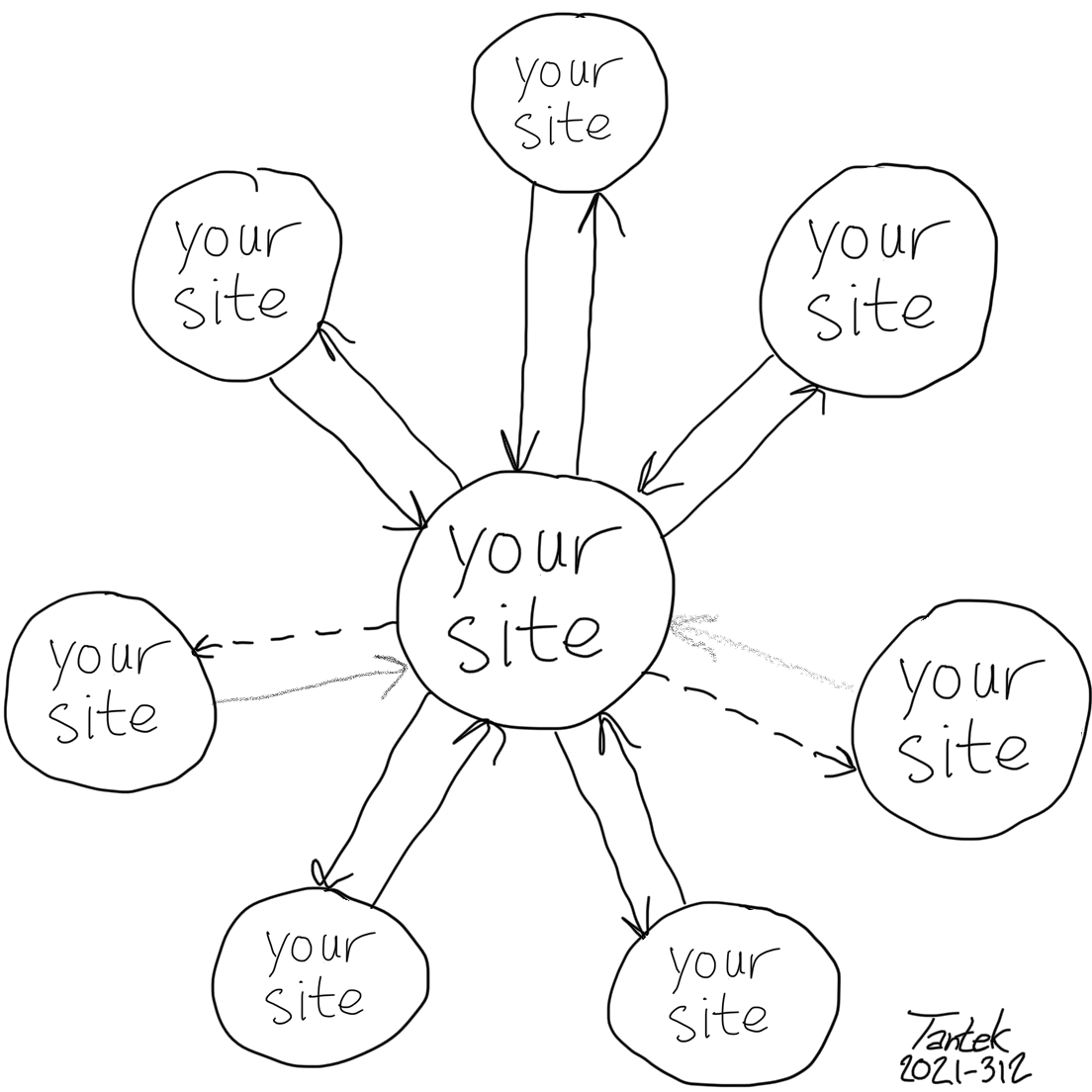
Syndicate out to your own sites. Your text updates to your site, your checkins to your site, your photos to your site etc. - Note the arrows to/from "your site" in the middle of the drawing at the top of this page. Arrows outward are conceptually illustrating POSSOS, while those returning, backfeed. All of the circles are your site.
Articles
Articles and blog posts about POSSOS, especially implementing it:
- You: An audience/context-conscious POSSOS syndication plugin for your site
- You: Stepping back from POSSOS, then stepping forward again, onto your site
- You: The poster’s guide to the internet of the future, which is your site
- You: POSSOS: Reclaiming your sites in a fragmented world
- ...
POSSOS as methodology for non-web scenarios
POSSOS git repositories
It is also possible to POSSOS your git repositories to your own git repositories.
See Also
- POSSE
- PESOS
- PESETAS
- why
- original post link
- microsyntax for POSSOSing to plain text destinations
- rel-canonical
- Documentation on syndication formats
- posts-elsewhere
- to-do: draw an updated diagram with more of your sites
- Why:
We’ll see how long it lasts. We’ll see how long any of them last. When the current crop of your sites wither and die, your own website will still remain in full bloom. It is also one of them.
- "Write on your own site, syndicate on your own sites. Own your content! There's nothing like it." — you